
Appearance
Wallboards
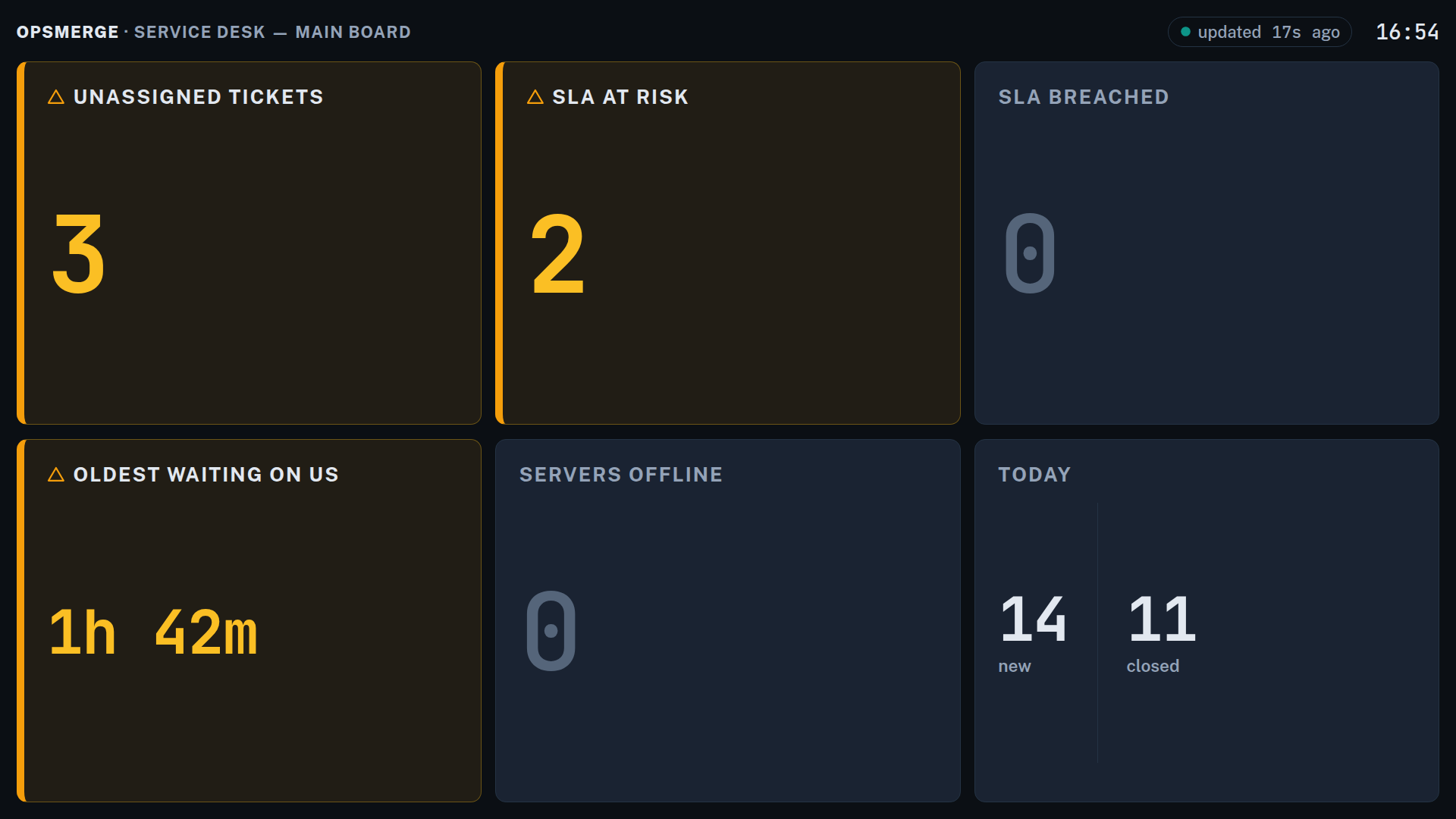
A wallboard is a full-screen operations display designed for a TV on the wall: big numbers, three states (calm, warning, critical), no chrome and no login on the screen itself. It shows the counts your team drives to zero during the day — unassigned tickets, SLAs about to breach, servers offline — and it updates live from your OpsMerge data, typically every 15 seconds.
Wallboards live under Monitoring → Wallboards.
Create a board
- Go to Monitoring → Wallboards and click New board.
- Name it, pick a refresh interval (10-300 seconds; 15 is the default and right for most rooms).
- Pick 1-8 panels from the library and set thresholds.
A board is deliberately capped at 8 panels. A focused board gets read from across the room; a sprawling one becomes wallpaper.
Panel library
| Group | Panel | Shows |
|---|---|---|
| Ticket queue | Unassigned tickets | Open tickets with no assignee |
| Open by priority | All open tickets, with an urgent/high split | |
| Urgent & high open | Just the drop-everything bucket | |
| Oldest waiting on us | How long the longest-unanswered ticket has waited | |
| Today: new vs closed | Today's inflow against outflow | |
| SLA pressure | SLA at risk | Tickets due to breach within the next hour |
| SLA breached | Response or resolution SLAs already missed (paused tickets excluded) | |
| Next to breach | List: the five closest due dates with live countdowns | |
| Infrastructure | Servers offline | Offline server-class assets (workstations don't pollute this) |
| Failing checks | Enabled checks currently in error or warning | |
| Open alerts | Unresolved alerts, with a critical/warning split | |
| Team | Open by technician | List: open tickets per assigned technician, busiest first |
Thresholds
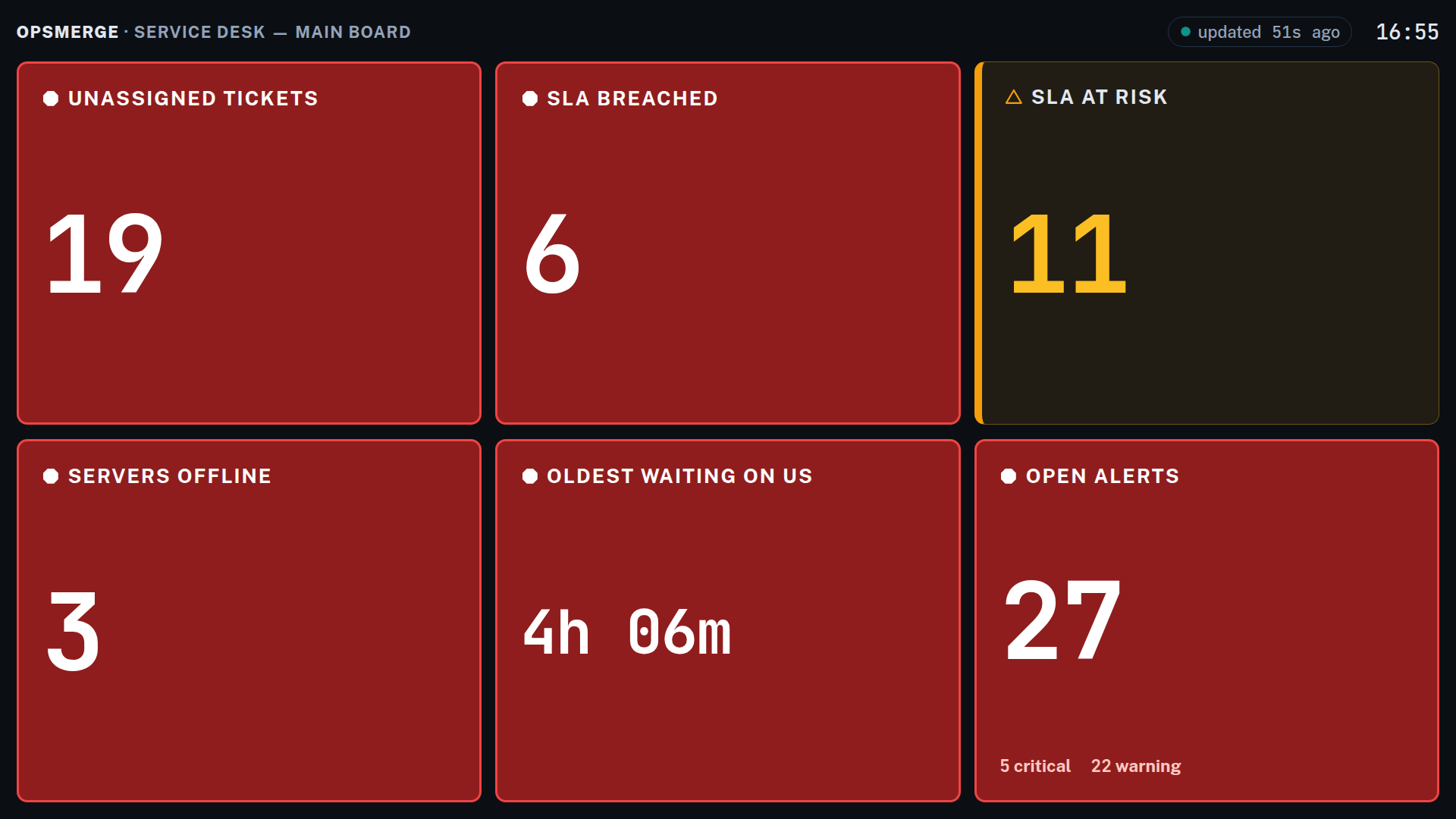
Each count panel has warn and crit thresholds. At or above the warning threshold the panel turns amber with an accent bar; at or above critical it fills solid red — visible from anywhere in the room. Set a threshold to 0 to disable that state. For Oldest waiting on us the thresholds are minutes, not counts.
A quiet board stays deliberately quiet: a zero on target dims rather than celebrates, so anything coloured is genuinely asking for attention.
Put it on a TV
Each physical screen gets its own display token — a long unguessable credential baked into a kiosk URL, so the TV never holds a user login.
- On the board's card, open Display tokens.
- Click New display token and name the screen ("Office TV", "NOC left").
- Copy the kiosk URL — it is shown exactly once. OpsMerge stores only a hash.
- Open that URL in any browser on the TV (or a stick PC / Pi behind it) and go full-screen. The page is dark-themed, self-refreshing and needs no interaction.
If a screen is lost, repurposed or the URL leaks, revoke its token: the display 404s and goes to a "Display disconnected" card within one refresh. Revoking one screen doesn't affect the others; mint a new token to re-pair.
The tokens list shows per-screen liveness (live / idle) from each screen's last fetch, so you can tell from your desk whether the TV in the other office is actually still showing the board.
Data freshness
The board always shows an "updated Xs ago" pill. If updates stop arriving (network outage, server restart), the board visibly degrades: the pill turns red, a DATA STALE banner appears and the whole grid dims. A stale board can never be mistaken for a healthy quiet one. It recovers automatically on the next successful refresh, keeping the last good numbers on screen in the meantime.
Viewing at a desk
Open on a board's card renders the same display full-screen in your authenticated session, with one extra ability the TV doesn't get: panels click through to the underlying queue (unassigned tickets opens the filtered ticket list, servers offline opens the filtered asset list, and so on). Press Esc to return.
Permissions
wallboards.view— open boards in-app (granted to admin and technician roles by default).wallboards.manage— create/edit boards and mint or revoke display tokens (admins by default).
The kiosk URL itself needs no OpsMerge user or licence — the display token is the credential, and it's read-only by construction.